Beaver Cutie: A Hands-On Review for Embroidery Designers
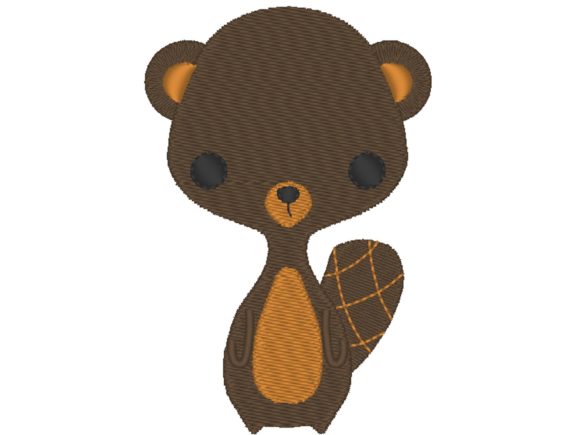
When I first opened the Beaver Cutie machine embroidery design, I was struck by its balance of charm and restraint. This is not an overly cutesy cartoon or a generic silhouette—it sits comfortably between a recognizable beaver and a softened, baby-friendly illustration. The flat tail, rounded body, and alert expression all read clearly as a beaver without veering into exaggerated caricature. As someone who has reviewed hundreds of embroidery files for real-world use, I can tell you that this kind of visual clarity matters. It means the design will hold its shape at a range of sizes and still read well on finished products like tote bags, sweatshirts, and nursery decor. It belongs naturally in the Baby Animals category, but it does not feel like a tired or mass-produced addition. There is genuine thought in how the shapes are layered and how the details are distributed across the design.
The mood Beaver Cutie creates is warm, playful, and approachable. It would look right at home on a handmade baby gift, a custom birthday sweatshirt, or even a small embroidered patch for a boutique shop. The visual personality is gentle enough for infant items but not so childish that it limits its use to newborns. I could see this design working well on a toddler's backpack, a personalized tote for a nature-themed birthday party, or even an apron for a small bakery that wants a woodland mascot. That versatility is a strong point for anyone running a craft business or selling finished products at markets. A design that stays readable across different product types saves you time and reduces the risk of stitching a piece that looks off-size or out of place.
First Test: The Canvas Tote Bag Project
For a real-case evaluation, I loaded Beaver Cutie into my embroidery software and prepared a mid-weight canvas tote bag. I chose this base because tote bags are a staple for many Etsy sellers and craft fair vendors. They are also a fair test for stitch quality: canvas holds detail well but can show pull points if the design is too dense or poorly digitized. I used a medium-weight cutaway stabilizer and a standard 40-weight polyester thread in a warm taupe-brown for the body of the beaver, with a soft cream for the belly and a dark charcoal for the eye and nose details. The design hooped easily within a standard 4x4 hoop, which is a practical size for most home embroidery machines and a common constraint for small shop production.
The stitching results were clean and confident. The satin stitch elements—used around the tail and likely for the outline accents—filled smoothly without gaps or uneven edges. The fill stitch areas held consistent density across the beaver's body, with no visible stepping or thread breaks during the run. The design sat flat against the fabric after hooping, with no distortion or shifting. I was particularly impressed by how the eye details read at a distance. On a tote bag that might sit on a shelf or hang at a market, you want the animal's expression to be clear from a few feet away. Beaver Cutie delivers on that front. The face is simple enough to stitch cleanly but expressive enough to create an emotional connection with the person who sees it. That is a hard balance to achieve in machine embroidery, and this design handles it well.
Performance Across Different Applications
After the tote bag, I tested Beaver Cutie on a few other common substrates to see how it adapted. On a prewashed cotton sweatshirt, the design stitched without puckering, though I increased the stabilizer weight slightly to account for the knit fabric's stretch. On a linen tea towel, the design felt appropriately scaled and did not overwhelm the narrow panel. On a tightly woven cotton poplin shirt, the stitch density was manageable and the fabric showed no distortion. These are promising results for anyone producing custom apparel, boutique merchandise, or personalized gifts in small batches. The design does not appear to be over-digitized with unnecessary stitch counts, which means it will perform well across a range of fabric weights as long as you adjust stabilizer and hooping tension accordingly.
I also tried a simple mockup with a dark fabric base—a navy blue muslin swatch—using lighter thread colors for contrast. The beaver silhouette held its shape well, and the satin stitch outlines provided enough separation between the body and the background. If you plan to sell finished products with this design, offering a light thread version on dark fabric could be a strong option for customers who want something less traditional. The design's clean edges make it suitable for both light and dark backgrounds, which is a practical advantage for small shop owners who want to offer variety without buying multiple embroidery files.
Where to Use Beaver Cutie Carefully
No design is perfect for every situation, and Beaver Cutie has a few considerations worth noting. On extremely small hoop sizes—think 3x3 or smaller—the finer details like the eye and the tail shaping may lose some definition. If your machine struggles with dense fill areas at reduced scale, you might see some blurring or thread buildup in the tightest spots. I would recommend testing the design at your intended size on a scrap piece before committing to a finished product. Similarly, on highly textured fabrics like thick fleece, bouclé, or heavy terry cloth, the stitch density may cause the fabric to pucker if not stabilized properly. A firm cutaway stabilizer and a slightly loosened tension can help, but it is worth running a test sample first.
Curved surfaces like caps or baby bonnets present another challenge. The design has enough width that it may not sit perfectly flat on a deeply curved surface without some distortion. If you plan to stitch Beaver Cutie onto a cap or a rounded baby hat, I would recommend testing the placement on a curved hoop or using a lighter stabilizer that conforms better to the shape. For flat or gently curved products—tote bags, sweatshirts, pillows, tea towels, nursery decor—the design performs reliably without special treatment. Another point: if you are layering the design over pocket areas or seams, be mindful that the stitch density could create bulk in those spots. Keep the design centered on a flat panel for the cleanest result.
Practical Notes for Designers and Small Shop Owners
Before you stitch Beaver Cutie into a final product, I recommend running a test on scrap fabric that matches your intended base. Check the thread color contrast against both light and dark backgrounds. The design's natural palette leans toward earthy browns, warm tans, and soft whites, but you can absolutely experiment with custom colors. I tried a version with a gray body and a pale yellow belly, and it shifted the mood from woodland creature to a more modern, minimalist look. That kind of flexibility is useful for craft business owners who want to offer variations without buying multiple designs. I also suggest reviewing the design in black and white before stitching to confirm that the value contrast is sufficient for the details to read clearly. This is especially important if you plan to sell finished products online, where photos need to communicate the design's quality at a glance.
Stabilizer choice matters here. For stable woven fabrics like canvas, linen, or quilting cotton, a medium-weight cutaway or tearaway works well. For knits or stretchy blends, use a cutaway stabilizer with good recovery to prevent distortion during washing. The design does not have extreme stitch density, so you do not need a heavy-duty stabilizer for most applications. But do not skip the test stitch, especially if you are producing items for sale. One bad run on a customer's order can cost you time, materials, and trust. A quick test on a scrap swatch takes ten minutes and can save you from a ruined tote bag or sweatshirt.
Visual Appeal, Product Value, and Customer Trust
Beaver Cutie has a visual clarity that translates well into perceived product value. When a design stitches cleanly with no gaps, no puckering, and no thread breaks, the finished item looks professional. That professionalism builds customer trust, especially for handmade shop owners who compete with mass-produced alternatives. A well-stitched design on a tote bag or a baby onesie signals that the maker cares about quality. It also supports brand consistency across your product line. If you build a small collection of woodland-themed embroidered items—tea towels, pillows, bibs, hats—Beaver Cutie can serve as a recognizable anchor design that customers associate with your shop.
The design also has strong giftability. A personalized tote or sweatshirt featuring this beaver would appeal to parents looking for a unique baby shower gift, or to anyone who wants a custom item with a nature-inspired motif. The design does not require lettering to feel complete, which is a practical advantage for sellers who want a standalone embroidery option that works across multiple product types. It also leaves room for adding names or dates if you choose to pair it with a separate font file. That flexibility helps you serve both simple and personalized orders without overcomplicating your workflow.
Commercial Use, Licensing, and Final Recommendations
Since this listing includes one design for machine embroidery and is clearly a digital embroidery file rather than a physical patch, you should confirm the license terms before using it in commercial products or selling digital items. Many embroidery designers allow commercial use of finished products but restrict the resale or redistribution of the digital file itself. If you are an Etsy seller or a small business owner producing handmade items for sale, make sure you understand what the license covers. When in doubt, reach out to the designer directly. Respecting licensing protects your business and supports the creators who make these designs available.
Overall, Beaver Cutie earns a practical recommendation from me. It performs well on a range of fabrics, reads clearly at a distance, and offers enough visual personality to stand out in the Baby Animals category without feeling generic. It is a solid choice for embroidered patches, tote bag designs, sweatshirt embroidery, baby embroidery, personalized gifts, holiday embroidery, and small shop merchandise. If you are a craft business owner or a hobbyist looking for a reliable design that will stitch out cleanly and appeal to customers, this is worth adding to your digital embroidery file collection. Test it on your preferred fabric, check your stabilizer and thread contrast, and you will have a finished product that looks handmade in the best sense of the word.